
Have you ever visited a website and then the next day, while browsing the internet, come across an ad for that same website? Or have you ever visited an online store, added products to your cart, didn’t check out, and then the next day while browsing the web you saw an ad featuring the products you left in your cart? You were “retargeted.”
The purpose of remarketing is therefore to display messages that match the interests and needs of your visitors in order to increase the chances of conversion.
As users, we are practically bombarded with information and advertisements at every turn today. That’s why we thoroughly research various options from different providers before deciding to make a purchase. We explore desired content throughout the day, in a wide variety of contexts and situations – over morning coffee, during a break at work, out for drinks with friends. We usually just quickly check out offers that seem interesting to us, and buy when the right moment comes.
In most cases, that’s at home, when we sit down in peace and in this way reduce the psychological risk that comes with every purchase. It is extremely rare for someone to buy a product or service on their very first visit. Statistics show that 95 to 98 percent of website visitors leave after the first visit without purchasing the desired item. And that is precisely why it is crucial to remind a new user – especially if we paid to bring them to the site – a few more times that they showed interest and let us know that our offer appeals to them. We want to reach them in an environment where they will feel comfortable completing the purchasing process.
WHAT IS REMARKETING
It is a type of online advertising where you show ads only to people who have already been on your website and have thereby shown interest in your offer. If you want to sell more online or get more leads from potential customers through your website, but don’t have a large advertising budget, remarketing can be an excellent strategy for you.
HOW REMARKETING WORKS
Remarketing, also known as retargeting, works by creating customized/planned advertising campaigns for those website visitors who have already (within a measured past period) visited your website or other content associated with your website.
The basic concept of remarketing is to target those visitors who are already familiar with your company’s brand and already know your products or services, as there is a greater likelihood of conversion with these visitors than with those who are visiting your website for the first time.
Remarketing is primarily about repeatedly targeting visitors and users of your website with the aim of guiding their browsing flow back to your website, moving them along the sales funnel and toward the final destination of conversion.
The most widely used tool for implementing remarketing is Google Ads, although the concept of remarketing can also be applied with other online tools and in other online marketing approaches.
EXAMPLE: You have an online store and offer online yoga courses. In addition to online courses, you also offer accessories for the workout itself – a yoga mat, ball, resistance band, etc. You’ve decided to offer your customers a 10% discount on your workout accessories, so you’re going to start with remarketing. You can now show ads with a 10% discount on workout accessories to everyone who purchased an online yoga course from you in the past month.
HOW REMARKETING CAN BENEFIT YOUR BUSINESS
- Remarketing helps you stay connected with your audience
Remarketing allows you to maintain a closer connection with your audience, even when they are not currently on your website or actively searching for your business. This is useful when it comes to increasing the visibility of your company or brand, and in this way you stay top of mind with your potential customers when they are making purchasing decisions.
But if you want to build and maintain an excellent relationship with your audience, you need to define who you want to retarget.
Defining your target market is a fundamental step in all types of marketing. It helps you create a solid foundation when launching any kind of marketing campaign, especially remarketing.
You can target every individual visitor to your website, but doing so will waste your time and money. Instead, ask yourself the following question: “Which people make the most sense to retarget?” For example, you could retarget people who were browsing your apartment cleaning service on your website. These are people who expressed an interest in learning more about that service – how you do it, what your price is if you have it listed, etc. Using remarketing, you could redirect these people back to you with a targeted ad about the service they’re interested in.
Keep in mind that when potential customers are looking for service providers, they don’t purchase those services right away. Instead, they research various options and compare different providers with each other. Let’s say you sell a premium apartment cleaning service. In this case, visitors want to know what you can offer and at what price, and then they visit your competitor’s website to evaluate the advantages and offerings of each company.
Can you prevent potential customers from comparing your company with other companies?
No, you cannot.
In most cases, potential customers compare companies, but remarketing will allow you to precisely target users who have visited your website and were searching for a service or product they currently need. Therefore, you need to create targeted ads for these target audiences so that you stay top of mind when they visit other websites.
2. Remarketing can lead to a higher conversion rate
The goal of online advertising is to encourage interaction with potential customers, such as submitting their information in a pre-prepared form on your website, downloading your e-book in exchange for their email, or making an online purchase of your product or service.
Remarketing can lead to higher conversion rates because this audience is already “warm” (a so-called “warm audience”). This happens by displaying ads to users even when they are not currently on your website, making your exposure 10 times greater than others. Ultimately, this can help build trust with potential customers and/or increase sales.
3. Lower cost per conversion and higher return
Another advantage of remarketing is a lower cost per conversion, which results in a higher return on investment.
Remarketing ads have a lower cost per click and cost per conversion than regular advertising campaigns. However, this result will still depend on the competitiveness of the industry in which you operate.
4. Targeted ad copy
With remarketing to those who have already visited your website, you create and offer highly targeted ad copy and images to bring them back to your website to make a purchase decision or get in touch with you.
You can also create different ads based on which services or products users viewed on your website.
For example, if you are a marketing company offering various online marketing services, you can specifically create an ad targeting users who viewed your social media management services, and a separate ad for those who viewed your email marketing services.
Remarketing is also an excellent channel for promoting a new offer, product, or service to an audience that has already been on your website. In general, remarketing creates a deeper and longer-lasting connection between your brand and your (potential) customers.
5. Remarketing allows you to display a more effective “call to action”
A purchase in most cases does not happen when users visit your website for the first time, which is why remarketing is there to help.
Remarketing is an excellent tool that allows you to show a potential buyer a new, more targeted ad. In the ad, invite them to make a purchase with phrases such as “call now” or “sign up for a free consultation” to draw potential customers back to your website. This can exponentially grow your business and also increase sales of your services or products.
6. More conversions through testing
This part is truly very important. Even though remarketing offers better conversions, you need to test and experiment with your advertising campaigns in order to achieve maximum results from your ads.
It is essential to test your remarketing campaigns just as you would with any other advertising campaign. Testing allows you to see what works and what doesn’t work in your advertising campaigns.
Without testing, your ads could be ineffective, meaning they fail to attract new customers, and you end up wasting both your money and your time.
To ensure your business truly benefits from remarketing ads, always measure and monitor your advertising campaigns. There are marketing analytics platforms that will give you powerful insight into which ads are performing well and which are not. They can help you achieve the best conversion rates.
PLATFORMS FOR CREATING REMARKETING CAMPAIGNS
Remarketing campaigns can be created on two of the most popular platforms: through Google Ads and Facebook advertising, or Facebook Ads.
Google Ads remarketing
Google Ads is online advertising that allows websites to show targeted ads to users who have already visited their website. Past visitors will see these ads while browsing the web, watching videos on YouTube, or reading news websites.
Google recommends that when starting your first remarketing campaign, you begin by targeting everyone who has viewed your homepage. Over time, you can increase ad relevance and lower your cost per click with more narrow targeting.
How to approach Google remarketing
Remarketing with Google Ads uses a small piece of code that you can add to any page or pages on your website. You can then create user lists for each tagged page. When someone visits your website and if they meet your set criteria and allow you to collect their cookies, their cookie ID will be added to the appropriate user list.
User lists allow businesses to create precisely targeted campaigns. Users who have visited a sign-up page are likely closer to conversion than those who have visited the homepage, for example. An ad, a discount code, or another sufficiently enticing incentive may work well for the first group, while a softer “learn more about the offer” style ad may achieve a better response from the second group.
How to set up remarketing in Google Ads
- Step: If you are not logged into your Google Ads account, log in.
- Step: Set your goals and campaign type.
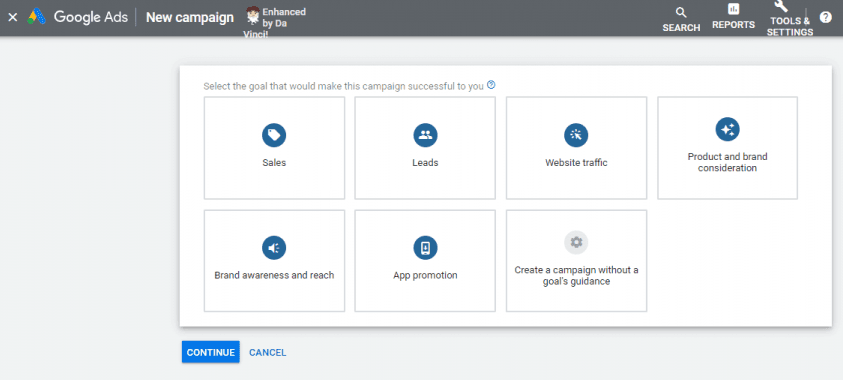
Click the “Campaigns” button found in the upper left corner of the menu panel. Click the blue “+” button to create a new campaign. You will be presented with a set of goal options that may look like this:
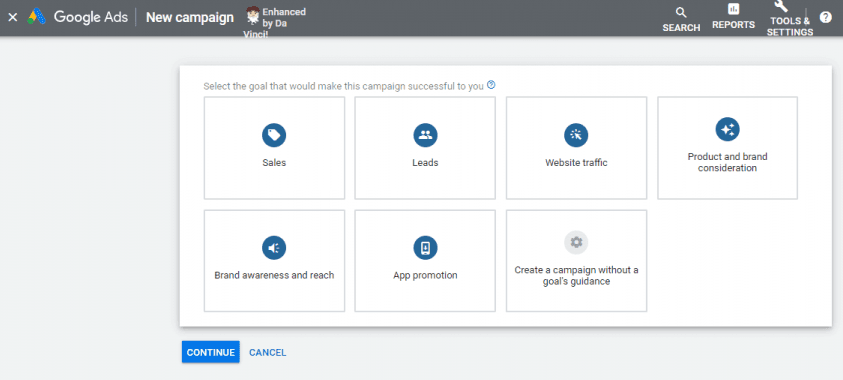
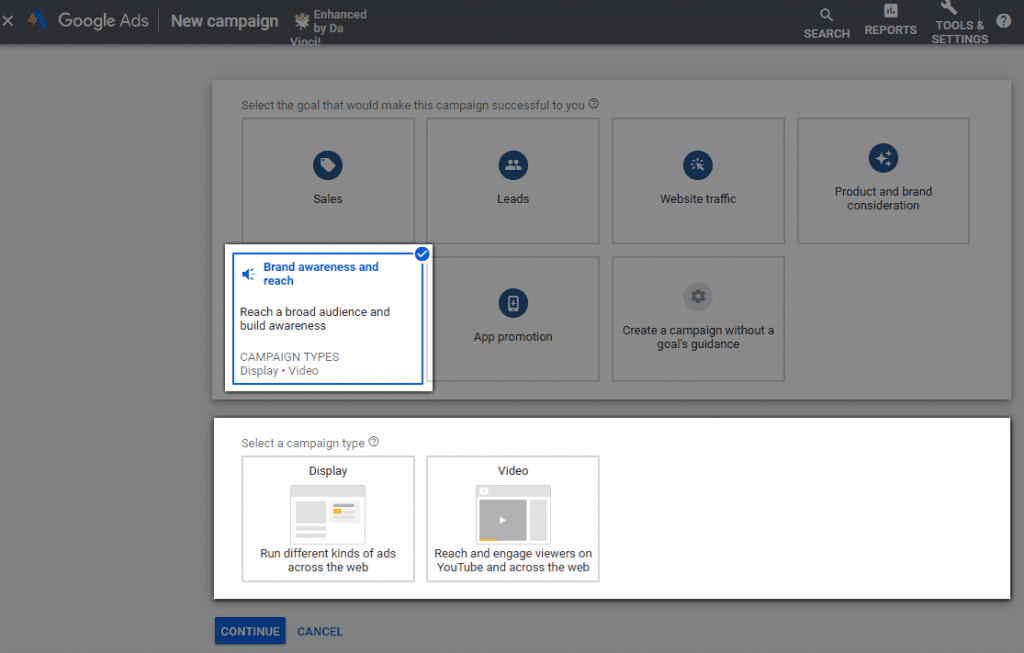
Hover your mouse over each box for more details and select a goal for your campaign. When you click on a goal, the “Campaign type” section will appear. Select the “Display” option.
Step 3: Set your campaign parameters
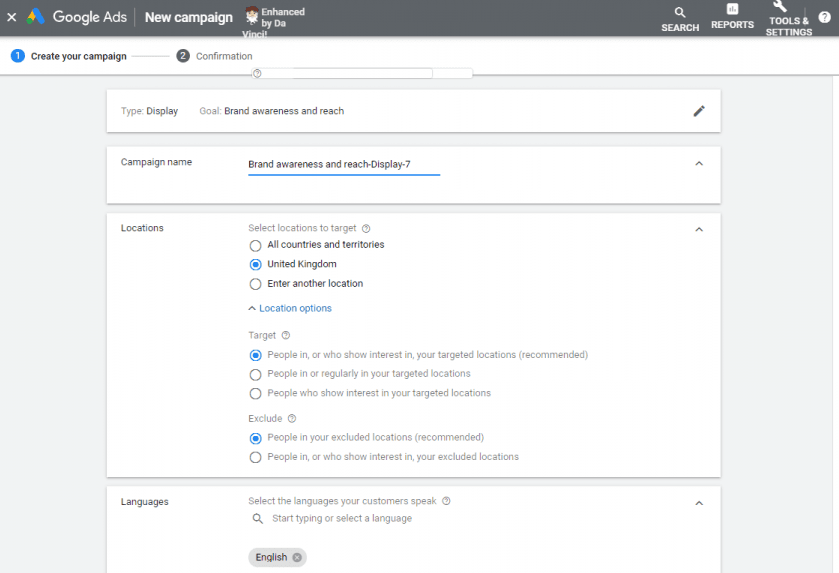
When you click the blue “Continue” button on the previous screen, you will be redirected to the “New campaign” page.
On the page that opens, fill in all the required fields, including the campaign name, location and language settings, strategy, budget, ad schedule, and campaign dates.
Step 4: Select your remarketing target audience
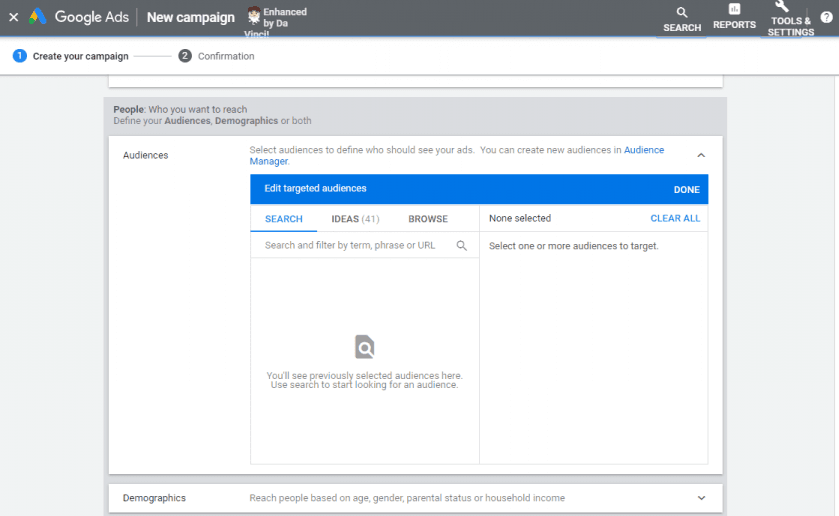
Now it’s time to use the list of your website visitors that you created earlier. Scroll down to the “People” section and find the “Audience” option.
Select “Remarketing” and check the box next to the target audience you want to target. Fill in the remaining fields – demographic data, etc. – and select the “Create campaign” option.
Facebook remarketing
With remarketing campaigns on Facebook, you can target website visitors as well as audiences on Facebook. This gives you a broader reach than other remarketing platforms, such as the Google Display Network. Once you install the Facebook Pixel on your website, it brings you data about visitors and conversions from Facebook ads, and allows you to retarget website visitors.
Facebook remarketing is particularly suitable for businesses that are relatively new and may not yet be generating the traffic they need for a larger advertising campaign.
Facebook Pixel
The Facebook Pixel was mentioned above. But what exactly is it?
Facebook Pixel is an analytics tool used to measure the effectiveness of your Facebook advertising. From a technical standpoint, it works on a similar principle to Google Analytics. It is essentially a snippet of code that you need to insert into the source code of your website.
By doing this, you can begin tracking the interactions of each visitor after they click on your ad. The Pixel reports every activity to Facebook and, in turn, to you.
The more conversions that occur, the better Facebook knows its users, making it easier to independently optimize ads by showing them to people who are more likely to take the desired action. If the Facebook Pixel is set up, campaigns can be optimized directly for conversions.
Based on the information gathered through Facebook Pixel, you can also create so-called “custom audiences,” which you can use in future advertising.
How to set up Facebook remarketing
Before creating a Facebook remarketing campaign, you first need to set up the Facebook Pixel. It is recommended that you set up the Facebook Pixel a few weeks before launching your remarketing campaign, so that the created audiences can already start populating with user data.
Custom Audiences
Custom audiences can help you retarget visitors to your website. By implementing the Facebook Pixel, you can track the behavior of users on your website who are simultaneously logged into Facebook. The Pixel will record which pages they visited and when. Using this data, you can then display a specific ad to a precisely defined target audience.
Custom Conversions
Custom conversions work in a similar way to custom audiences, but as the name suggests, they refer to specific conversions that can further be used as an audience — that is, a group of people who have already purchased a product, downloaded a guide, etc. A conversion occurs when a specific desired action takes place that brings the user to a particular “final” page. This is typically a thank-you page that appears to the user after they purchase a product, fill out an inquiry form, submit a comment, and so on. When creating custom conversions, you can select a specific category based on the type of conversion (guide download, newsletter sign-up, product purchase, etc.), whereby the Facebook algorithm already optimizes the audience settings on its own toward more successfully achieving the set goal.
How to create remarketing audiences?
In Ads Manager, click on the dotted icon, navigate to “All Tools” by clicking the arrow icon, and from the “Advertise” column select “Audiences.” In the next step, a window opens with a list of audiences and a dropdown menu at the top of the page labeled “Create Audience.” You can choose between “Custom,” “Lookalike,” and “Saved Audience.”
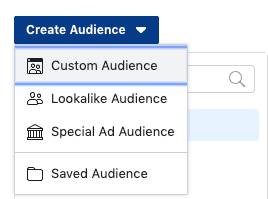
If you select “Custom Audience,” several additional options will appear, including “Custom File,” “Website Traffic,” “App Activity,” “Offline Activity,” and “Engagement.”
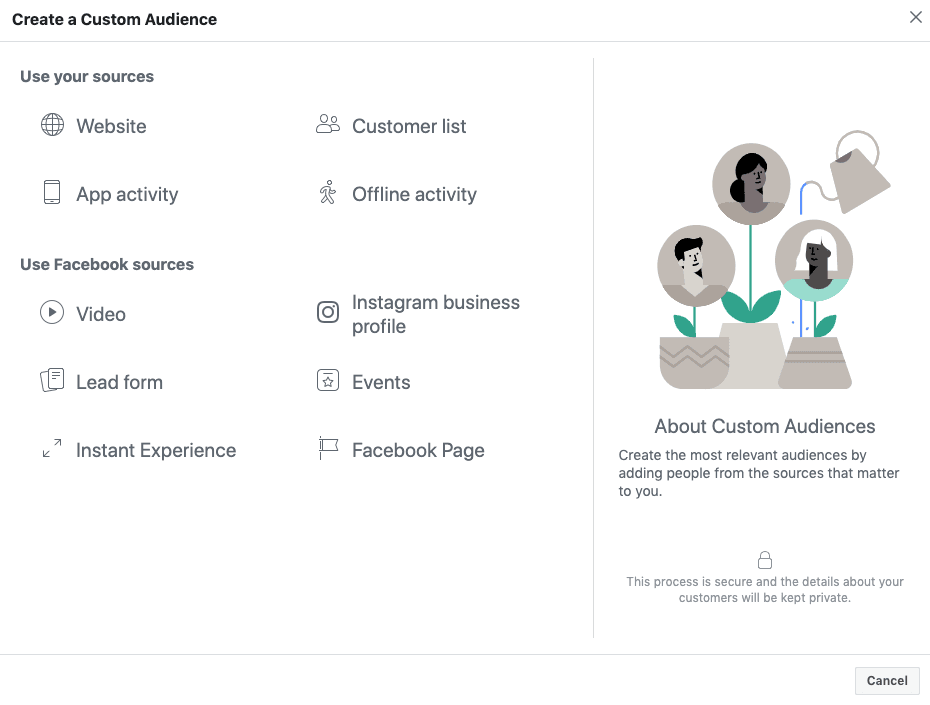
Custom Lists (“Customer List”)
Custom lists are one of the most powerful tools Facebook offers when it comes to remarketing. The email addresses of your website visitors are an excellent way to start building your audience. By collecting data on your website, you can then upload it to Facebook, where Facebook recognizes when those users use social media. If they use the same contact information on both platforms, you can reach them with very specific and personalized ads.
Website Traffic (“Website”)
You can target all users who visited your website, those who visited more than two subpages, or those who visited specific subpages. You can advertise to everyone who visited your website in the last seven, 30, or up to a maximum of the last 180 days.
Now that you have created all your desired audiences, it’s time to start preparing your campaign. In Facebook Ads Manager, click the green “Create” button and you will see the view below, where you select your campaign objective based on the desired result – more website traffic, new leads, more conversions, etc.
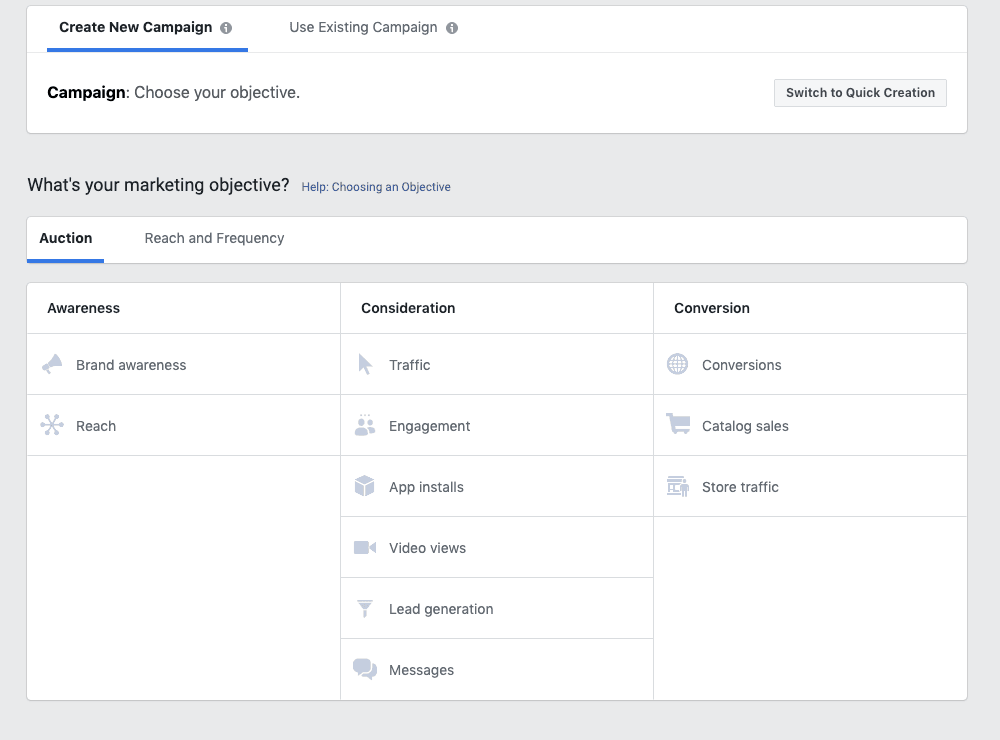
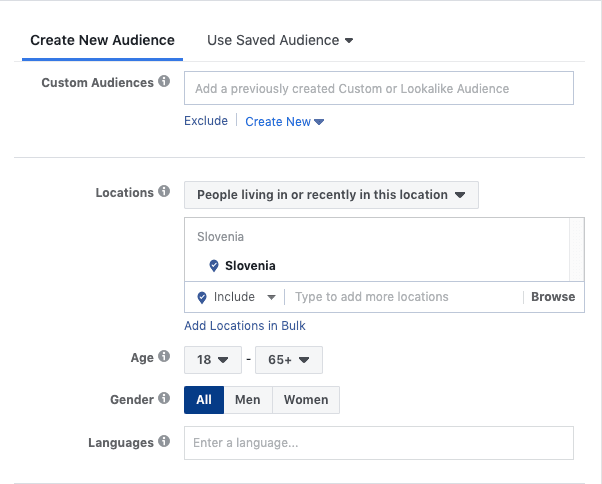
Once you select your desired campaign objective, you create an ad set where you can choose from the previously created audiences by searching for them in the “Custom Audiences” field. All other settings for the ad set and individual ads are the same as the settings for a basic Facebook campaign.
PLAN YOUR REMARKETING STRATEGICALLY
Just as you plan every marketing activity in your business, plan your remarketing strategically as well.
This means that first and foremost, you clearly define what goals you want to achieve and which users you want to reach with it. Strategic planning is also essential when deciding on the time frames for displaying ads. Just like in Google Ads, you can display ads only on certain days of the week and at certain times of the day. This way, you can target your potential customers on specific days and at specific times that are most optimal and when conversions are most likely to occur.
It is also important to clearly determine whether the purchase cycle of your product is longer or whether it is a special, short-term offer. In the first case, you need to approach advertising very thoughtfully and be prepared to test and change creatives and messaging over time. In the second case, you need to act more aggressively, as you only have a short window of time to convince the user to make a purchase.
AND ONE FINAL TIP…
Be careful not to fatigue your potential customers. Ad fatigue occurs when ads become too familiar to an audience or they have seen them too many times, causing them to become bored and quickly stop paying attention to them.
As a result, your campaigns become less effective over time, which negatively impacts your desired outcome.
To avoid this, you don’t need to rack your brain trying to come up with the most creative idea of all time — you can simply test different combinations of creatives and messaging to bring a little freshness to your campaigns.
Research shows that even small changes, such as swapping the background or the color of the call to action button, have a very positive impact on ad performance.
You can find even more useful information about advertising on Google and using Google Ads in a free webinar at the following link: