

With the help of Google Ads, you can take your brand, product sales, and visibility to a whole new level. Regardless of what you sell, whether you work alone, run a small or large business, and your goal is to increase sales and earnings, you’re in the right place! Perhaps until now you haven’t been part of this remarkable channel of global proportions, which will be introduced in this article.
It’s hard to hide the enthusiasm for the Google Ads platform (previously known as Google Adwords). The modern population today actively uses Google and YouTube search engines on a daily basis. So why not take advantage of this fact and present your offers right there for them? Google Ads additionally offers a large number of free tools that will help you improve and increase sales. You gain insight into current trends; into the set of keywords and their associated monthly searches; you also find out what has the greatest demand and what your potential customers search for most often. You can explore this valuable data yourself even if you ultimately decide not to use Google advertising at all. All of this is available for free within the Google Ads platform itself. In any case, it is definitely worth your attention and insight if you want to increase profitability in selling your products or services.
Which type of Google Ads is right for you?

Video ads on YouTube
Your ads will be shown to potential customers in YouTube search results. You start creating a video ad when determining the campaign type, where you select the video ad option. After all, you can also successfully promote your YouTube channel with Google Ads and thus expand your opportunities for greater earnings.
Search and display network ads
Your ads can appear in search networks as Google search results. They are always positioned right at the very top and stand out above all other organic search results. They can also appear within display networks on other websites.
A combination of both: video ads + search and display networks
It is recommended that you create multiple different Google ads rather than, for example, going overboard with the daily budget amount. This approach gives you two benefits. First, you properly test the market and see the response, and second, you won’t overpay Google. Explore and try different options first to see which ads generate a greater customer response.
How to create a Google ad?
After free registration on Google Ads, select Campaigns – create a new one. Then determine what the goal of your campaign is – sales, lead generation, increasing traffic to your website, brand awareness, … Next, determine the type of your campaign – video ads, shopping ads, display ads, … Among the campaign subtypes, it is most recommended to select Custom Campaign. Set the campaign name. Bidding strategy – here you set the maximum CPV, meaning the highest price you are willing to pay when a customer clicks on your ad. Budget and display schedule – start with lower daily amounts to first test the ad and see results. In Networks, indicate where you want your Google ad to appear. It’s possible to display the ad among YouTube search results (video discovery ad), or as a video during YouTube video playback (in stream or video discovery ad). Select the language your potential customers speak and the location where they live (you can also exclude locations here).
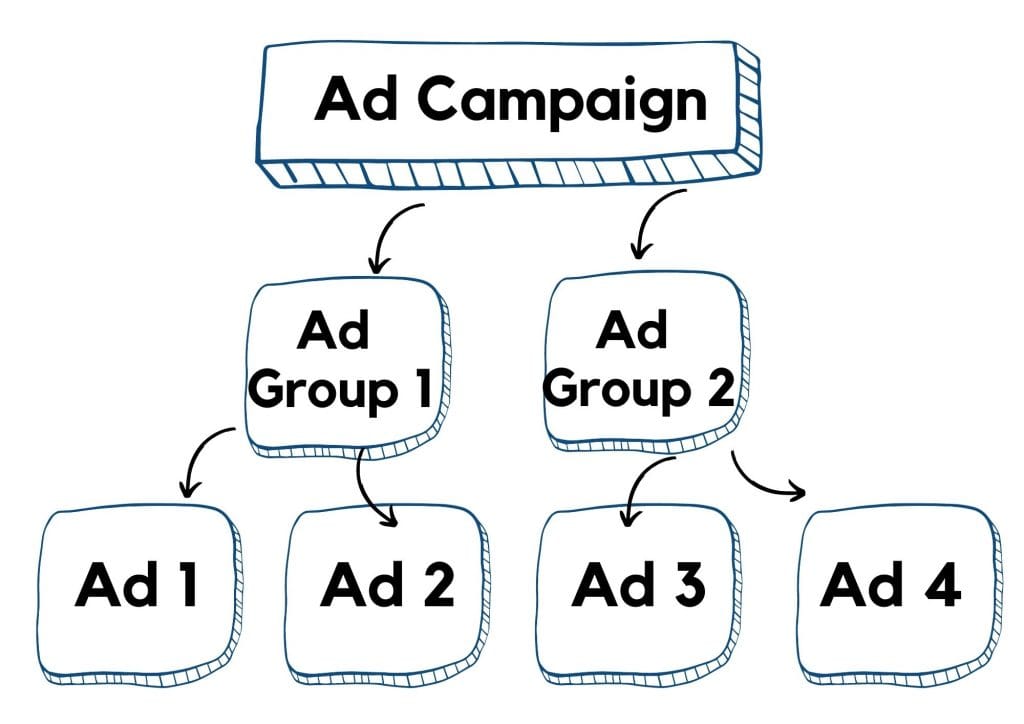
Create a new Ad Group, which you name as you wish so you can quickly distinguish it from others when you have multiple. This part represents one of the decisive roles in how well you will sell your products. Specifically, this is where you determine who you want to reach with your ads, or in other words, who your potential customers and buyers are. Define demographic characteristics such as gender, age, family status, income, …
Google Ads structure: Campaign – Ad Group – Ads. You can have multiple different ad groups within one campaign. You can also have multiple Google ads within one ad group.
You also define keywords for which your Google ad should appear. These are the words that your potential customers type into the Google or YouTube search engine, and your ad appears if it is relevant to them. Google Ads, as part of its platform, offers the option to use the keyword planner, which will undoubtedly be of great benefit to you.
How does the keyword planner help you?

This is an extremely powerful tool that you will greatly benefit from and significantly increase the success of your Google ads and, consequently, your sales. With the keyword planner, you can determine exactly what your potential customer will type into the search engine for your ad to appear. It therefore allows ads to be displayed based on broad match, phrase match, or exact match. Consider how relevant your Google ad will be to someone who types certain words into the search engine. Is it a more general term or perhaps a very specific one? You decide this yourself, as only you know best what your target audience is and what they type into the search engine.
How to get keyword ideas?
The simplest yet most practical tip is to start by using Related Searches. Type the most suitable keyword for you into the Google search engine, then look at the bottom of the page at the section of related or similar searches. Here you can see what and how people have typed words into the Google search engine in different ways when looking for a particular thing. With related searches, you can easily uncover numerous ideas for yourself that you might not have thought of on your own.
It is also warmly recommended that you simply check your competition. Look at what those who are already successfully selling similar products to yours are advertising and what is bringing them high sales results. Before they reached that goal, they have certainly already invested quite a bit of money in Google advertising, so why not follow examples of good practice? Research your competition, as this will shorten your testing phase and at the same time save you advertising money.
Over time, you will see what results certain keywords bring you, and based on such testing, you will optimize your ads for greater earnings. The next step is the actual content preparation of the Google ad.
Content of Google ads is queen
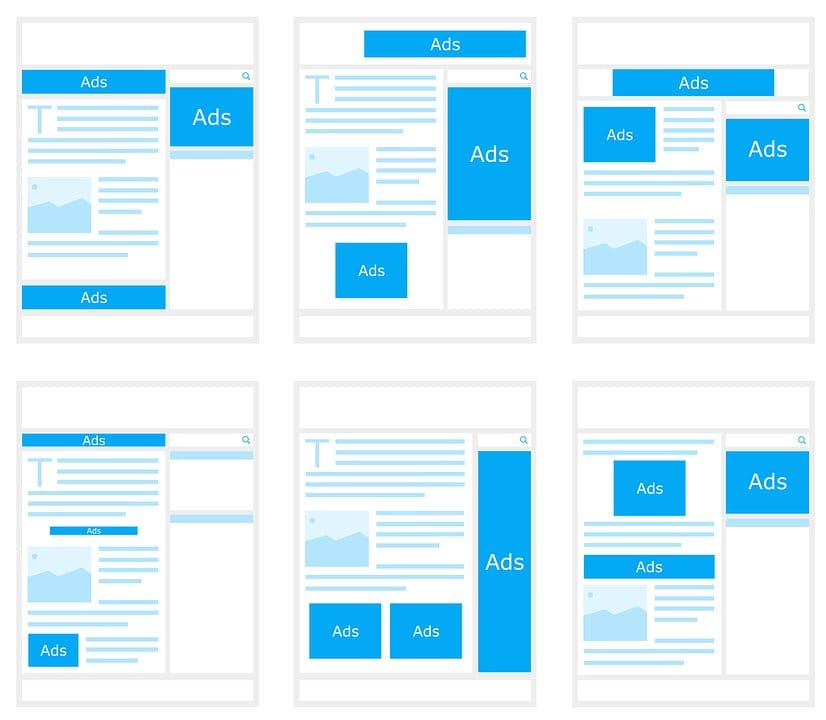
It is undoubtedly important how the Google ad itself is written. This encompasses both the content side and the visual appearance. When creating a Google ad, you can continuously monitor a preview of the ad on the right side and see how it will look on a mobile phone or computer. Once you are satisfied with everything, simply click Create.
You upload your video, add a title and description. As simple as that, yet it plays the main role in whether you will truly attract the customer, as this is what they see and read first. Create a title that highlights the benefit and immediately draws people in to read more. You need to convince them in a few interesting words to actually click on your ad.
The text itself should not contain errors, as this prevents the customer from getting the wrong impression of you — that you are careless or not serious.
When it comes to creating the video itself, don’t stress about it. The simpler you are, the better your ad will turn out, as practice shows. You don’t need professional equipment, a top-of-the-line video camera, or a sound engineer for your video to be well received. Experience shows that completely simple recordings with a mobile phone or simple animations with interesting content perform excellently. The goal, after all, is not the technical perfection of the ad, but increased sales, and the prerequisite for that is that people accept you. So focus instead on your message that you are conveying to your target audience.
How successful is your Google ad?
Of course, after successfully completing your ad setup, you’ll want to know what the results are. Google Ads has taken care of this as well. The platform also offers quite a few free statistics for monitoring your ads. This means you get insight into reports showing where they were displayed, what their placements are, and analytics on where you paid the most or least per customer or conversion.
What must not be missing from your website to maximize earnings?

Clearly highlighted benefits for your customer. Emphasize your advantages that set you apart from the competition. Perhaps it’s a buy-one-get-one offer, free shipping, shipped the next day, …? The focus here is not on the product features themselves, but on the advantages and benefits that the buyer gains as a valued customer. Give them that extra reason why they should order from you, contact you, write to you, …
Easy adding of products to the cart. Unfortunately, even today there are websites that attract a very eager customer to their site, and just as they’re about to make a purchase, they’re met with a labyrinth and no clear, simple Add to Cart button available. This button must be placed in a visible location so that the buyer notices it immediately and can easily access it.
A presented FAQ section that answers your potential customers’ most common concerns in advance. Be specific and clear here, don’t beat around the bush, and be straightforward. The customer should feel welcomed and, above all, understood on your website, so mystery and stinginess don’t work particularly well here. The easiest way to do this is to put yourself in the role of a buyer on your own website. What would interest you, what haven’t you emphasized enough, what do customers always ask you about? Compile this content into a FAQ section.
Consistency of the offer in your Google ad and on your website. Make sure your offer is clear as soon as the buyer lands on your page. Let the buyer actually find exactly what you are advertising waiting for them there.
Website loading speed on mobile. Things need to run smoothly and quickly to keep the buyer engaged. You can check how responsive your website is on mobile here >> click.
Don’t miss this invitation:
If you’d like to learn even more tips and concrete guidance for successful selling with Google Ads, you can watch a free Google webinar with new useful content. Sign up here – https://zannekrep.com/brezplacno10/